


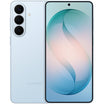


Fujifilm Instax Mini Evo (Instant Camera Type-C)
- International stock, 1-2 days fast dispatch.
- Estimated Delivery Time Frame: 5-7 Business days
- One Year Australian Seller Warranty.
Product Overview
- International stock, 1-2 days fast dispatch.
- Estimated Delivery Time Frame: 5-7 Business days
- One Year Australian Seller Warranty.
The Fujifilm Instax Mini Evo Camera is a hybrid instant camera that combines digital capture with iconic Instax mini prints, giving you the flexibility to shoot, preview, and then print only your favourite moments. Its 1/5 inch CMOS sensor with primary colour filter records images to internal memory or a microSD/microSDHC card, storing about 45 shots internally or roughly 850 per 1 GB on card. With a bright F2.0 lens (28 mm equivalent in 35 mm terms), single AF with AF Illuminator, and a shooting distance from 10 cm to infinity, the Mini Evo is ideal for everything from close up details to everyday scenes.
Automatic features make shooting straightforward. A programmable shutter from 1/4 to 1/8000 second, ISO 100 to 1600, Program AE, multi metering, and adjustable exposure compensation from -2.0 EV to +2.0 EV in 1/3 steps help you capture well balanced images in a range of lighting conditions. White balance presets (Auto, Fine, Shade, multiple Fluorescent, and Incandescent) ensure accurate colour, while the built in flash offers Auto, Forced, and Suppressed modes with a range of about 50 cm to 1.5 m. Creative control is a key part of the Mini Evo: 10 lens effects and 10 film effects combine to deliver up to 100 unique looks, so you can style every shot before you print.
Bluetooth 4.2 (BLE) links to the Instax Mini Evo app on iOS and Android for smartphone image printing, remote shooting, printed image transfer, and firmware updates. A 3.0 inch TFT colour LCD (approx. 460,000 dots) lets you review and manage your images and prints, with print history storing up to 50 shots for easy reprints. The internal rechargeable lithium ion battery supports around 100 prints per charge and recharges in about 2 to 3 hours via Micro USB Micro B or USB Type C (charging only, depending on production batch).
Product Specification
| Image Sensor | 1/5 inch CMOS with primary color filter |
| Recorded Pixels | 2560 x 1920 |
| Storage Media | Internal memory, microSD/microSDHC memory card |
| Storage Capacity | Approx. 45 images in internal memory; approx. 850 images per 1 GB on microSD/microSDHC |
| Recording Method | DCF compliant, Exif Ver 2.3 |
| Focus Distance (35 mm Eq.) | f = 28 mm |
| Aperture | F2.0 |
| Auto Focus | Single AF (with AF Illuminator) |
| Shooting Distance | 10 cm to 8 |
| Shutter Speed | 1/4 second to 1/8000 second (automatic switching) |
| Shooting Sensitivity | ISO 100 to 1600 (automatic switching) |
| Exposure Control | Program AE |
| Exposure Compensation | -2.0 EV to +2.0 EV (1/3 EV steps) |
| Metering Method | TTL 256 split metering, multi metering |
| White Balance | Auto, Fine, Shade, Fluorescent 1, Fluorescent 2, Fluorescent 3, Incandescent |
| Flash Modes | Auto flash, Forced flash, Suppressed flash |
| Flash Range | Approx. 50 cm to 1.5 m |
| Self-Timer | Approx. 2 seconds / approx. 10 seconds |
| Image Effects | 10 lens effects, 10 film effects (total of 100 combinations) |
| Print Pixel Count | 1600 x 600 dots (800 x 600 dots when printed from smartphone app) |
| Print Resolution | 25 dots/mm x 12.5 dots/mm (635 x 318 dpi, 40 x 80 µm dot pitch); 12.5 dots/mm from smartphone app (318 dpi, 80 µm) |
| Exposure Gradation | RGB gradation of 256 colors |
| Printable Image Format | JPEG images taken with this unit |
| Print Output Time | Approx. 16 seconds* *Plus approx. 7 seconds when printed using instax-Rich Mode immediately after startup. |
| Print Functions | Print from internal memory or memory card; reprint from print history (up to 50 images) |
| Smartphone App Functions | Smartphone image print, remote shooting, printed image transfer, firmware upgrade |
| LCD Screen | 3.0 inch TFT color LCD, approx. 460,000 dots |
| External Interface | (1) Micro USB Micro-B (charging only) (2) USB Type-C (charging only, in transition since mini Evo brown manufacturing) |
| Power Supply | Internal lithium ion battery (not removable), built-in charging |
| Number of Prints per Charge | Approx. 100 prints (from full charge; depends on usage) |
| Charging Time | Approx. 2 to 3 hours (varies with temperature) |
| Main Unit Dimensions | 87 mm x 122.9 mm x 36 mm (excluding projecting parts) |
| Main Unit Weight | Approx. 285 g |
| Operating Environment | Temperature 5°C to 40°C; Humidity 20% to 80% (no condensation) |
| Film Used | FUJIFILM instant film instax mini (sold separately) |
| Wireless Interface | Bluetooth Ver. 4.2 (BLE) |
| Compatible App OS | iOS / Android (availability varies by OS version) |
- Hybrid Instax mini camera with 1/5 inch CMOS sensor and digital preview
- Bright F2.0 28 mm eq. lens, AF from 10 cm to infinity, and ISO 100–1600
- Up to 100 creative looks with 10 lens effects and 10 film effects
- Instax mini printing at 1600 x 600 dots with 256 colour RGB gradation
Related Products


Frequently Asked Questions
How do I place my order?
Once you have finished adding items to your shopping cart, point your cursor to the red button saying "ADD TO CART." You will then be transferred to our secure CHECKOUT page to either login to your account if you have or place an order without one.
After providing this information: name and shipping details, you need to choose the shipping method (Standard, Express or P.O. box which takes an extra 5 days). Once done, Kindly proceed to payment terms.
You will now need to enter your payment details. After completing payment, you are asked to choose if you're billing address is same as shipping address or use a different one. Once you are ready to complete your order, click "Complete order." You will receive an on-screen order confirmation, as well as a second confirmation via e-mail.
If you have difficulties in the checkout process, please feel free to contact our customer service support via chat or email.
How do I remove items from my shopping cart?
First, click on the "Cart" icon on the upper right corner of the webpage. This will allow you to check all items that are currently in your shopping cart. Once you have identified the item tha you want to remove, click the X icon on the right side next to the price of the item. Once done, choose update cart and you can now continue shopping or complete your order.
What if I need to change my address?
Please email us or have a chat with our Customer Service support team with your changes. Address changes may need additional approval through our verification process. Please note: If an order is already in transit (package has already left our warehouse), we can no longer change the shipping address for you. You need to contact the courier directly for this request.
Do you offer a wholesale service?
At BuyMobile we provide the best small quantity unit pricing available on every item. Our algorithms run daily to determine the lowest cost in stock supplier.
However if you are looking to purchase multiple items there is an efficiency of scale around sourcing and fulfilment that means we may be able to offer better pricing on a larger order.
If you are a business or looking for a bulk purchase and would like a quote, please fill in our wholesale application form with your details. If you are looking to make regular purchases, we offer credit accounts to vetted customers, so please complete this application.
Once received, our wholesale team will come back to you with price, availability, payment and ETA information.

Do you have more questions?
End-to-end payments and financial management in a single solution. Meet the right platform to help realize.