Smartphones today are more powerful than ever, but let’s be honest, most of them feel exactly the same. Sleek glass designs, similar camera layouts, and endless notifications fighting for your attention.That is exactly where the Nothing Glyph Interface changes the game.At first glance, it looks like a design gimmick. A few LED lights on the back of a phone. But once you actually start using it, you realise it is something much smarter. It is a new way to interact with your phone without constantly staring at your screen.So what exactly is the Glyph Interface, and why is it becoming one of the most talked-about smartphone features in Australia and beyond in 2026?
At a Glance
-
LED light system on the back of Nothing phones
-
Visual alerts for calls, messages, and notifications
-
Charging progress shown through light patterns
-
“Flip to Glyph” for instant silent mode
-
Designed to reduce screen time and distractions
What Is the Glyph Interface?
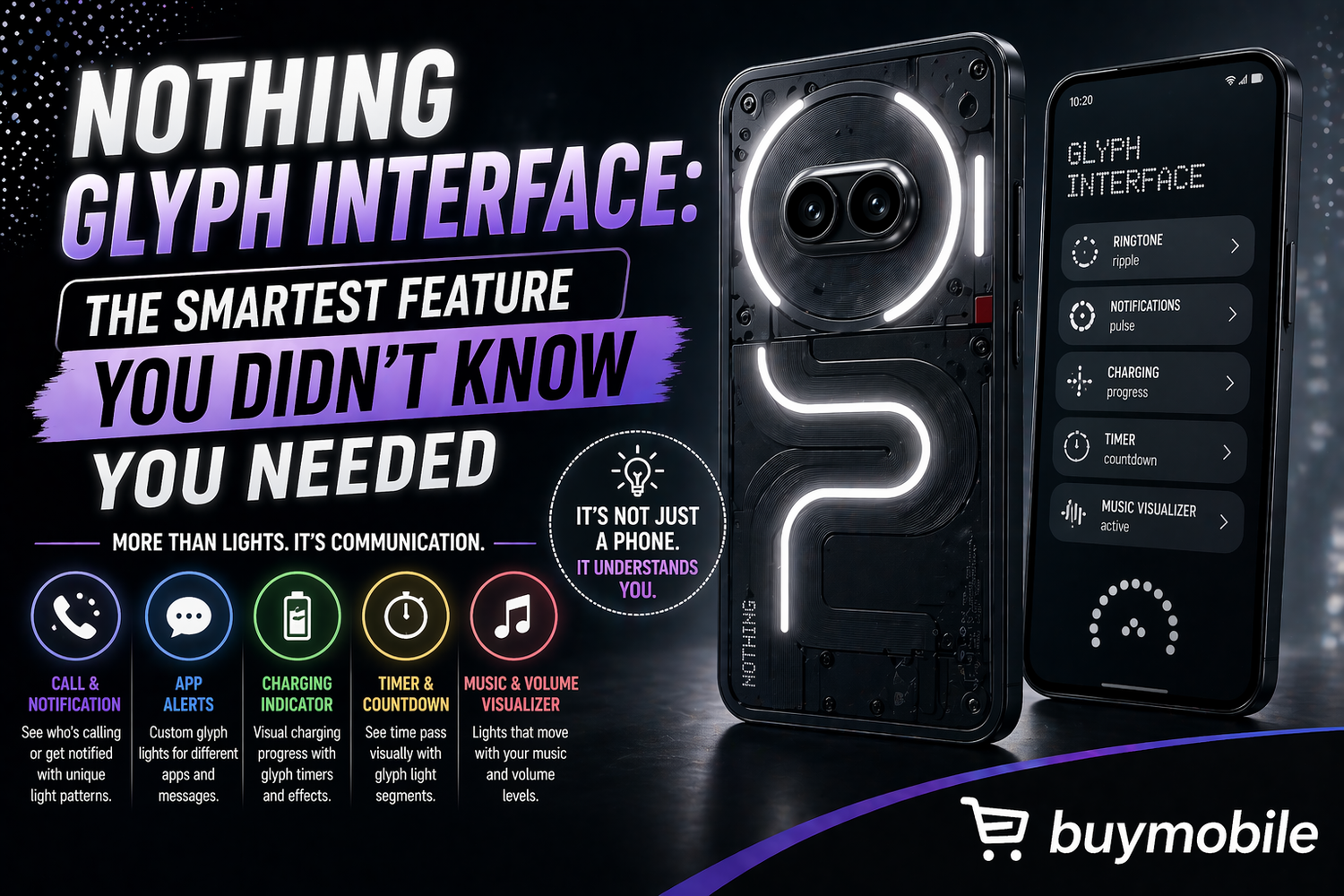
The Glyph Interface is a system of LED light strips placed on the back of Nothing smartphones. These lights illuminate in different patterns depending on what is happening on your phone.Instead of relying only on sound or vibration, the phone communicates visually. Each notification, ringtone, or alert can trigger a unique light pattern.In simple terms, it allows your phone to “talk” to you without needing you to unlock it.This may sound like a small change, but it fundamentally shifts how you interact with your device. Instead of reacting to constant notifications, you can simply glance at your phone and decide whether it needs your attention.
Why It’s Trending in 2026
The rise of the Glyph Interface is not random. It aligns perfectly with a growing global trend: people want less screen time and fewer distractions.Smartphones have become essential, but also overwhelming. Constant notifications, endless scrolling, and digital fatigue are real problems.
Nothing’s approach is refreshingly simple:
-
Reduce the need to check your screen constantly
-
Make notifications less intrusive
-
Create a more mindful smartphone experience
Newer versions, such as the Glyph Bar on the Nothing Phone 4a, simplify the design while still offering multiple LED zones for clear and effective visual alerts.It is not just about aesthetics. It is about changing behaviour.
How It Actually Helps in Daily Life
Visual Notifications
Instead of unlocking your phone every few minutes, the Glyph Interface lets you understand what is happening at a glance.Different light patterns can indicate calls, messages, or app notifications. This is especially useful in situations where checking your phone is inconvenient or inappropriate, such as:
-
Work environments
-
Study sessions
-
Meetings
You stay informed without being distracted.
Flip to Glyph: Focus Without Missing Out
One of the most practical features is Flip to Glyph.When you place your phone face down, it automatically switches to silent mode. However, instead of completely blocking notifications, the Glyph lights continue to provide visual alerts.This creates a perfect balance between focus and awareness. You can concentrate on your work while still knowing if something important comes through.
Charging Indicator
Another underrated feature is the charging indicator.The LED strips display your battery level visually while charging. Instead of unlocking your phone to check the percentage, you can simply glance at the lights.It is a small detail, but one that improves everyday convenience.
Custom Alerts for Contacts
The Glyph Interface also allows customisation. You can assign specific light patterns to individual contacts.This means you can instantly recognise who is calling or messaging without picking up your phone.
For example, you could assign:
-
A unique pattern for family
-
Another for close friends
-
A different one for work contacts
It adds a personal touch while improving usability.
Camera Fill Light
The Glyph lights are not just for notifications. They can also act as a soft fill light for photography.In low-light conditions, this helps improve image quality by providing balanced lighting without harsh flashes.For content creators and casual users alike, this is a surprisingly useful addition.
Why It Works Well for Australian Users
The Glyph Interface fits naturally into Australian lifestyles.
-
Bright outdoor environments make visual alerts easier to notice
-
Public transport usage benefits from silent notifications
-
Social settings increasingly value reduced screen time
Instead of constantly checking your phone in public or social situations, the Glyph Interface allows you to stay connected more subtly.It is not just a design feature. It is practical and relevant.
Pros and Cons
Pros
-
Unique and instantly recognisable design
-
Helps reduce screen time and distractions
-
Useful for silent notifications
-
Customisable light patterns
-
Adds personality to the phone
Cons
-
May feel unnecessary at first
-
Slight impact on battery life due to lighting
-
Works best when the phone is face down
-
Limited colour customisation
Is It a Gimmick or Actually Useful?
The honest answer is that it starts as a gimmick but quickly becomes useful.At first, it might seem like just another flashy feature designed to stand out. But over time, it changes how you interact with your phone.You check your screen less. You become more selective about notifications. You feel less overwhelmed.It does not replace core smartphone features, but it enhances everyday usage in a subtle and meaningful way.
FAQs
What is the Glyph Interface in Nothing phones?
It is a system of LED lights on the back of the phone that visually alerts users to calls, notifications, and charging status.
Is the Glyph Interface useful in daily life?
Yes. It helps reduce screen time while still keeping you aware of important updates.
Does the Glyph Interface drain battery?
It has a minimal impact on battery life, and the feature can be turned off if needed.
Can you customise Glyph lights?
Yes. You can assign different light patterns to contacts, notifications, and alerts.
Is Glyph available on Nothing Phone 4a?
Yes. The Nothing Phone 4a features an updated version called the Glyph Bar with multiple LED zones.