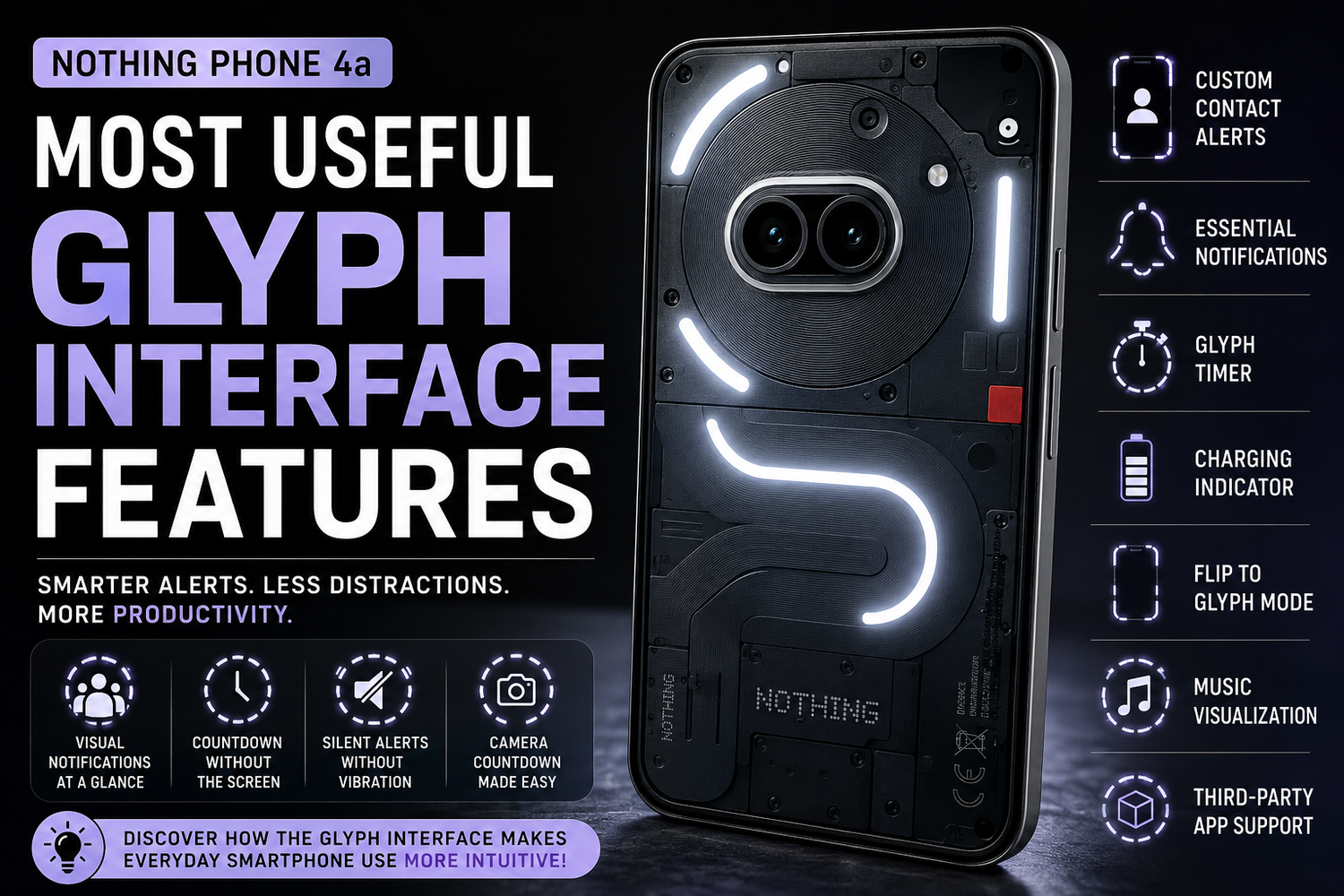
The Nothing Phone 4a continues the brand's unique approach to smartphone design with its signature Glyph Interface. Unlike traditional smartphones that rely heavily on screen-based notifications, the Glyph Interface uses LED light strips on the back of the device to provide visual alerts and useful information. While many people initially view the Glyph Interface as a stylish design element, it offers several practical features that can improve productivity, reduce distractions, and enhance the overall smartphone experience.
What Is the Glyph Interface on the Nothing Phone 4a?
The Glyph Interface is a collection of LED light strips integrated into the rear panel of the Nothing Phone 4a. These lights illuminate in different patterns to communicate notifications, charging status, timers, and other useful information. The primary goal is to help users stay informed without constantly checking their phone screens.
How Does the Glyph Interface Help Reduce Screen Time?
One of the biggest advantages of the Glyph Interface is its ability to deliver information visually. Instead of picking up your phone every time a notification arrives, you can simply glance at the back of the device to understand what's happening. This helps reduce unnecessary screen interactions and encourages healthier smartphone usage habits.
Can the Glyph Interface Show Notifications for Specific Contacts?
Yes. One of the most useful features is the ability to assign unique Glyph patterns to individual contacts. This allows users to identify who's calling or messaging without unlocking the phone. For example, family members, close friends, or work contacts can each have their own lighting pattern, making it easier to prioritize important communications.
What Are Essential Notifications?
Essential Notifications is a feature that allows users to select specific apps or contacts whose notifications remain highlighted through the Glyph Interface until they are checked. Instead of getting lost among dozens of alerts, important messages stay visible through a persistent light indicator. This feature is particularly useful for work emails, banking alerts, calendar reminders, and urgent messages.
How Does the Glyph Timer Work?
The Glyph Timer transforms the rear LEDs into a visual countdown tool. Once a timer is set, the illuminated segments gradually decrease as time passes. This allows users to monitor countdown progress without turning on the display. It's especially useful for cooking, studying, exercising, or using productivity techniques like the Pomodoro method.
Can the Glyph Interface Display Charging Progress?
Yes. The Glyph Interface acts as a charging progress indicator by lighting up different sections of the LED strips as the battery charges. Users can quickly check charging status without waking the screen. This feature is particularly convenient when the phone is charging across the room or on a wireless charging stand.
What Is Flip to Glyph Mode?
Flip to Glyph is one of the most practical features available on the Nothing Phone 4a. When the device is placed face-down, it automatically enters a mode where notifications are communicated solely through the Glyph lights. This minimizes visual distractions while still ensuring that important calls and alerts are not missed.
Why Is Flip to Glyph Useful for Productivity?
Many people get distracted by constant screen notifications during work or study sessions. Flip to Glyph allows users to keep their phones nearby without being tempted to check every notification. The visual alerts provide awareness without interrupting focus, making it an excellent feature for productivity-conscious users.
Does the Glyph Interface Work as a Volume Indicator?
Yes. Whenever users adjust media volume, the Glyph LEDs visually represent the current volume level. This provides immediate feedback and enhances the overall user experience. While it may seem like a small feature, it adds convenience when listening to music, watching videos, or connecting audio devices.
Can the Glyph Interface Sync With Music?
The Nothing Phone 4a supports music visualization through the Glyph Interface. During audio playback, the LED lights can react to sound and rhythm, creating dynamic lighting effects. While this feature is primarily designed for entertainment, it highlights the creative possibilities of the Glyph system and adds a unique element to music listening sessions.
Does the Glyph Interface Support Third-Party Apps?
Yes. Nothing has opened the Glyph ecosystem to developers through dedicated APIs. This allows third-party applications to create custom lighting interactions. Depending on app support, users can receive visual updates for ride-sharing services, food deliveries, fitness tracking, and productivity tools. As more developers adopt the platform, the usefulness of the Glyph Interface is expected to grow significantly.
How Does the Glyph Interface Help With Photography?
The Glyph Interface includes a visual camera countdown feature that activates when using the camera timer. Instead of relying solely on on-screen countdowns, the LEDs provide clear visual signals before the photo is captured. This is especially useful for group photos, selfies, tripod shots, and content creation.
Can the Glyph Interface Replace Vibrations?
For many users, yes. The bright LED notifications offer a silent alternative to vibrations and notification sounds. This makes the Glyph Interface ideal for office environments, meetings, classrooms, and other situations where silent communication is preferred. Users can stay informed without disturbing others around them.
Is the Glyph Interface Just a Gimmick?
While many people initially assume the Glyph Interface is simply a design feature, long-term use reveals its practical value. Features like Essential Notifications, Flip to Glyph, charging indicators, contact-specific alerts, and timers provide real-world benefits that help users manage notifications more effectively and reduce digital distractions.
What Is the Most Useful Glyph Feature on the Nothing Phone 4a?
The answer depends on individual usage habits, but many users consider Essential Notifications and Flip to Glyph the most valuable features. Together, they help prioritize important alerts while reducing unnecessary screen time. For productivity-focused users, the Glyph Timer is also among the standout features.