Foldable smartphones have evolved beyond being eye-catching devices to become practical tools that improve the way people work and communicate. One of the biggest reasons behind this transformation is Samsung's Flex Mode. The Galaxy Z Flip 8 takes this feature to the next level, allowing users to perform everyday tasks more efficiently while taking full advantage of its unique folding design. Instead of simply being a compact smartphone, the Galaxy Z Flip 8 becomes a hands-free workstation that supports productivity whether you're working from home, travelling, or managing a busy schedule.Here's how the Galaxy Z Flip 8's Flex Mode helps users get more done throughout the day.
What Is Flex Mode?
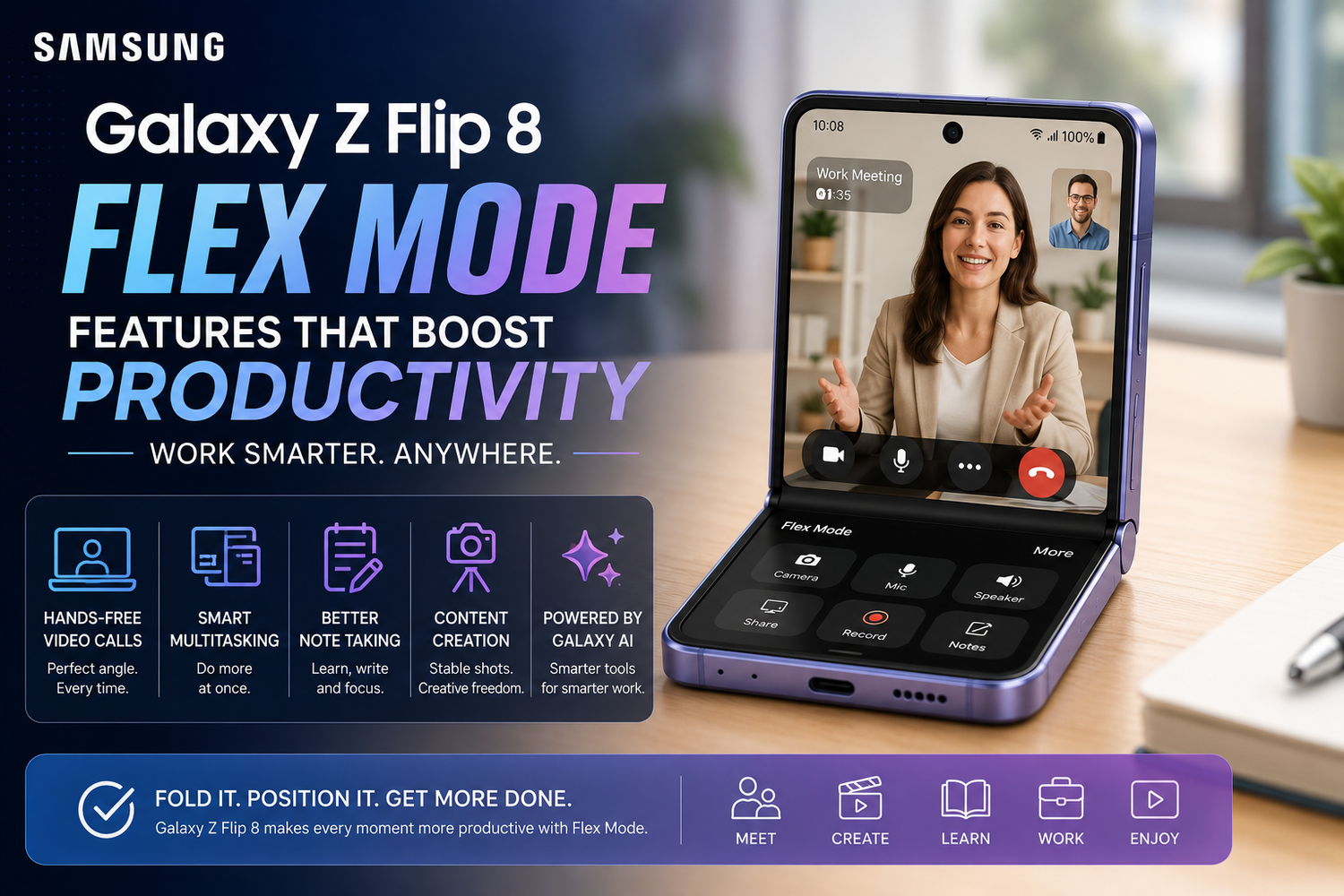
Flex Mode is Samsung's software feature that activates when the Galaxy Z Flip 8 is partially folded. Rather than displaying content across the entire screen, compatible apps automatically adjust their layout to make better use of the folded position.Typically, the upper half of the display shows the main content, while the lower half becomes a control panel with buttons, touch controls, or navigation shortcuts. This unique interface allows users to interact with apps without needing a separate stand or accessory.The result is a more comfortable and efficient experience for both work and entertainment.
Hands-Free Video Meetings Anywhere
Video calls have become an essential part of modern work, and the Galaxy Z Flip 8 makes them significantly more convenient.Instead of holding the phone or searching for something to prop it against, users can simply fold the device and place it on any flat surface. The camera remains perfectly positioned for video conferences, allowing users to participate comfortably while keeping both hands free.This is particularly useful during business meetings, online classes, virtual interviews, and client presentations. Users can take notes, type on a keyboard, or review documents while remaining fully visible throughout the call.For professionals who frequently attend virtual meetings, Flex Mode offers a noticeable improvement in convenience.
Easier Multitasking During Work
The Galaxy Z Flip 8 combines Flex Mode with Samsung's multitasking features to improve workflow.While attending a video call on the upper portion of the display, users can access meeting controls or quick shortcuts on the lower section without interrupting the conversation. Switching between supported applications also feels smoother thanks to Samsung's refined One UI software.Checking emails, reviewing calendars, responding to messages, and managing daily tasks becomes much more efficient when the phone adapts its interface automatically.This makes the Galaxy Z Flip 8 an excellent productivity companion for professionals who spend much of their day communicating.
Better Note Taking and Studying
Students and professionals can also benefit from Flex Mode while studying or reviewing documents.By placing the phone on a desk, users can watch online lectures, webinars, or training sessions hands-free while simultaneously taking notes in a notebook or on another device.The stable viewing angle reduces distractions and creates a more comfortable learning environment. Whether you're following an educational video, reviewing presentations, or participating in online workshops, Flex Mode helps maintain focus without constantly adjusting the phone's position.
Improved Content Creation
Content creators often need flexibility when capturing videos or photos.Flex Mode transforms the Galaxy Z Flip 8 into its own tripod. Users can position the phone at various angles without carrying additional equipment.This makes recording cooking videos, makeup tutorials, fitness demonstrations, product reviews, or social media content much easier.The stable positioning also helps produce smoother videos while eliminating hand shake during long recording sessions.For creators working independently, this feature simplifies the entire filming process.
Professional Quality Selfies
Taking selfies becomes much more versatile with Flex Mode.Instead of stretching your arm or relying on selfie sticks, users can position the Galaxy Z Flip 8 on a table, shelf, or other surface. This allows for more natural poses while ensuring everyone fits comfortably into group photos.The ability to preview shots and adjust positioning without holding the phone also improves portrait photography.Combined with Samsung's advanced camera software, Flex Mode helps users capture high-quality photos with minimal effort.
Convenient Media Controls
Entertainment also benefits from Flex Mode.When watching videos, the upper half of the screen displays the content while the lower half provides playback controls. Users can pause, skip, adjust volume, or control brightness without covering the video itself.Whether watching movies during travel or following online tutorials while working, this layout creates a more enjoyable viewing experience.The hands-free design also makes the Galaxy Z Flip 8 ideal for streaming content during meals, workouts, or desk work.
Perfect for Cooking and DIY Projects
Flex Mode proves especially useful in situations where both hands are occupied.While following recipes in the kitchen, users can position the Galaxy Z Flip 8 on the countertop without worrying about holding the device. The screen remains visible while cooking, allowing recipes and timers to stay within easy view.Similarly, DIY enthusiasts can follow repair guides, craft tutorials, or assembly instructions while keeping both hands available for the task.This simple convenience saves time and reduces interruptions throughout the project.
Enhanced Galaxy AI Integration
Samsung's Galaxy AI features become even more practical when combined with Flex Mode.Users can participate in multilingual conversations using Live Translate while keeping the phone positioned between participants. AI-powered transcription tools automatically record and organise meeting notes during discussions.Writing assistance helps draft emails or improve messages, while intelligent photo editing allows users to refine captured images immediately after taking them.The larger interactive workspace created by Flex Mode makes these AI features feel more natural and productive.
A More Comfortable Everyday Experience
One of the greatest strengths of Flex Mode is how naturally it fits into daily life.Instead of requiring users to change their habits, the Galaxy Z Flip 8 adapts to different situations throughout the day. Whether making video calls, watching content, attending online meetings, creating videos, studying, reading recipes, or capturing photos, Flex Mode continuously provides practical advantages.Its versatility makes the foldable design far more than a visual novelty. It becomes a feature that genuinely improves productivity.
Why Flex Mode Sets the Galaxy Z Flip 8 Apart
Many smartphones offer powerful processors, excellent cameras, and bright displays. However, very few can physically transform into their own stand while intelligently adapting the software interface to match.This combination of hardware innovation and software optimisation gives the Galaxy Z Flip 8 a unique advantage over traditional smartphones.Rather than simply folding for portability, the device actively changes how users interact with their phone, making everyday tasks more efficient and enjoyable.